Cyber Commands Cheatsheet
An interactve commands cheat sheet, useful for CTF, quick references, and certification courses
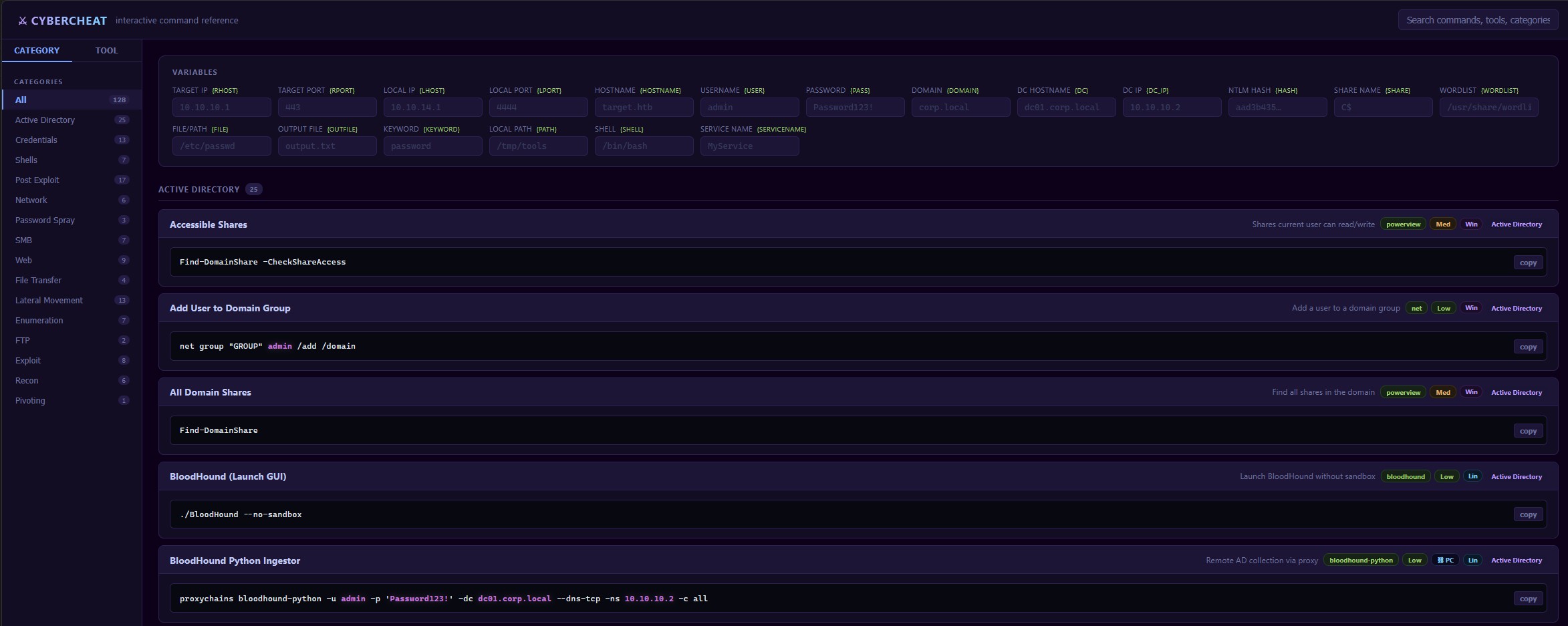
Introducing CyberCheat — An Interactive Command Reference
I’ve lost count of how many times I’ve been mid-session, known exactly what tool I needed, and still had to stop and dig through old notes just to remember the right flag order or syntax. It breaks flow, and it’s kind of annoying.
So I built CyberCheat — a command reference I actually want to use.
What It Is
CyberCheat is a browser-based cheat sheet covering common security commands and tools. Nothing groundbreaking on the surface — there are plenty of cheat sheets out there. But the thing that makes this one different is that it’s interactive.
The Part That Actually Matters
Most cheat sheets hand you a static command like this:
nmap -sV -p- 192.168.1.1You read it, then you go edit it yourself. Fine, but it adds friction.
CyberCheat lets you plug in your own values — target IPs, file paths, ports, whatever the command needs — and it updates the commands in real time across the whole sheet. You fill in your variables once, and everything adjusts. What you’re looking at is always ready to copy and run, not a template you have to mentally translate first.
That’s the core idea: cut the gap between finding a command and using it.
Why I Built It This Way
When I’m working through something, I don’t want to context-switch into editing mode. I want to reference something quickly and get back to what I’m doing. Static references are fine for learning, but when you’re in the middle of work they slow you down more than they help.
The interactive variable system was the obvious fix. It keeps the cheat sheet feeling like a tool rather than a document.
Check It Out
If you do any kind of security work — whether that’s CTFs, home lab stuff, or just tinkering — give it a try: cheatsheet.zacheryphillips.com
Plug in your target, grab your command, get back to it.